Woody Cross: Word Connect
- 4.6
- Rating
- 1.00M
- Installs
- Free
- Price
 Analysis by App-foxy
I spent time with Woody Cross: Word Connect as a relaxed word game rather than treating it like a quick download to test for five minutes. That distinction matters because its appeal is gradual: you solve anagrams, fill crossword-style boards, and settle into a repeatable rhythm that works especially well when you want something light but still mentally active. It is free to start, suitable for Everyone, and developed by Athena.Studio.
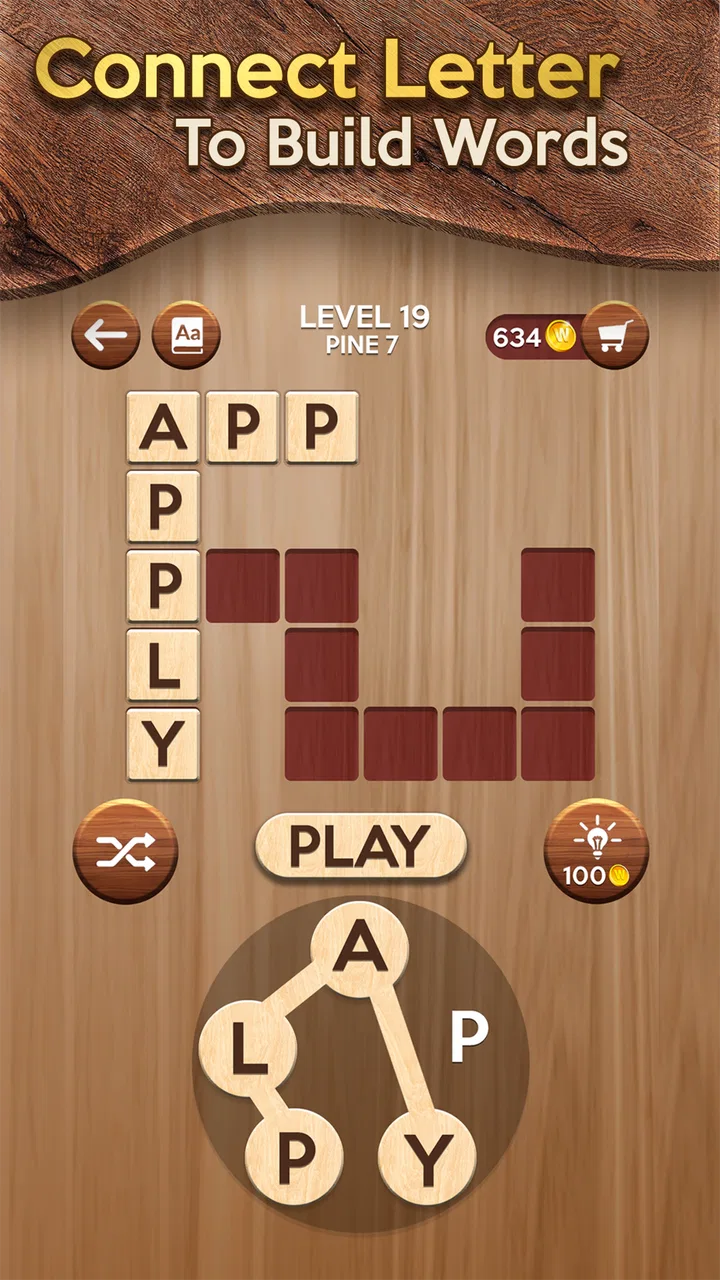
The basic promise is easy to understand. A group of letters sits in front of you, and your job is to connect them into words that fit the available puzzle spaces. Some answers are obvious, while others appear only after I stop looking at the letters as a random group and begin rearranging them mentally. The game does not depend on a complicated story or a large collection of characters, so the quality of the experience comes almost entirely from the clarity of the boards and the fairness of the word challenges.
That makes it a good candidate for short breaks, quiet evenings, or a few minutes before bed. It is also the kind of game that can become surprisingly absorbing once I start chasing the last missing word on a board. My overall impression is positive, but I would not recommend it equally to everyone. Players who want deep competitive play, detailed vocabulary explanations, or a completely interruption-free experience may find better choices elsewhere.
You May Also Like

 Blood Strike: 2.5 Anniversary
Blood Strike’s Loadouts Turn Every Drop Into a Tactical Gamble
A close look at Blood Strike’s custom loadouts: how fast access to signature weapons reshapes its battle royale rhythm, rewards preparation, and narrows the gap between fights.

 Pandora - Music & Podcasts
Pandora’s Music Is Easy to Start, but Harder to Recover
Pandora’s strength is its low-effort path from a seed to a station. Its weak spot is how much confidence it asks you to place in connection, setup, and quiet recovery.

 8 Ball Pool
 Is Built on Rivalries, Rematches, and Routine
A close look at the rivalries, rematches, shared routines, and unanswered safety questions that turn a quick pool match into a persistent mobile community.

 Samsung Music
’s Quiet Strength Is Playing What You Already Own
Its reach comes less from spectacle than from dependable access to a personal library. That simplicity is both the app’s strongest retention engine and its ceiling.

 AccuWeather: Weather Radar
AccuWeather Review: A Quick, Clear Forecast for Everyday Decisions
For everyday plans, the best forecast is the one you can understand quickly. AccuWeather makes rain timing, radar, and local conditions easy to act on, with a few trade-offs.

 Hill Climb Racing
Why Hill Climb Racing Still Turns Crashes Into One More Run
A tiny car, a bumpy hill and one more upgrade: Hill Climb Racing keeps resurfacing because its simple chaos makes every near-miss feel personal.
More From Our News Desk



How a normal puzzle session feels
My usual workflow begins with a quick scan of the available letters. I do not immediately tap every possible combination. Instead, I look for familiar short words first, then test whether those letters can form longer answers. This gives me a foothold on the board and reduces the feeling that I am guessing blindly. Once a few spaces are filled, the remaining pattern usually becomes easier to read.
The crossword structure gives the anagram mechanic more direction than a simple word scramble. I am not merely trying to create any valid word; I am trying to find words that belong in a particular arrangement. That small change makes the game feel more purposeful. A word that seems unimportant on its own can reveal a crossing letter that unlocks another answer.
I found the best sessions happen when I resist the urge to use help too quickly. If I am stuck, I first rotate the letters in my head, search for common endings, and consider whether a short word may be hiding among the obvious longer possibilities. This is one of the most useful habits for new players because it turns each puzzle into a small process instead of a series of random taps.
There is also a pleasant difference between solving a board quickly and solving it completely. The first goal is simply to keep progressing. The second requires more patience because the final spaces often depend on less familiar combinations. I like that distinction, although players who dislike leaving anything unfinished may feel more pressure than they expect from such a casual-looking game.
In everyday use, I can imagine opening it during a commute, while waiting for an appointment, or during a short coffee break. A puzzle does not require me to remember a complicated objective after putting the phone down. I can close the game and return later without needing to rebuild a strategy. That makes it more convenient than many larger games that punish interruptions or demand a long uninterrupted session.
When the simple routine works best
The game suits people who enjoy language puzzles but do not necessarily want a traditional newspaper crossword. The letter connection mechanic lowers the entry barrier, while the crossing layout adds enough structure to keep the activity from becoming a pure guessing exercise. I would especially suggest it to someone who likes casual brain training, vocabulary games, or quiet mobile entertainment without action controls.
It is less suitable for a player who needs a strong sense of progression beyond solving boards. The satisfaction here comes from the puzzle itself. If you expect character upgrades, a substantial narrative, multiplayer competition, or elaborate strategy systems, this is not aiming at that kind of experience. Its modest scope is part of its charm, but also its clearest limitation.
The current version is 2.24.0, and the game supports devices running Android 7.0 or later. That makes it accessible on a broad range of Android phones, including older devices that may struggle with visually heavier games. I still recommend keeping the app updated when an update is available, especially if a particular phone behaves oddly, but the low technical demand is one of its practical strengths.
Settings I would check before settling in
With a word game, settings can be easy to ignore because the core controls look so simple. I still make a quick inspection before playing regularly. I look for options related to sound, music, notifications, and any assistance or display preferences that may affect how I want to use the game. The best configuration depends on the situation: I may want audio at home, but silence is more appropriate in a waiting room.
Turning down unnecessary sound is not only about comfort. It helps me concentrate on the letter patterns, particularly when I am working through a difficult board. If I am playing in short bursts, I also prefer a setup that does not make the game feel more demanding than it is. A quiet interface makes the experience feel closer to a pocket crossword than to a conventional mobile game.
I also pay attention to notifications. A puzzle game is easy to return to without reminders, so I would avoid allowing alerts to interrupt unrelated tasks unless I genuinely find them useful. This is a small adjustment, but it changes how the app fits into daily life. The game works best as something I choose to open, not something that repeatedly asks for attention.
Because the game is free, I would also review any purchase prompts with care. In-app purchases range from $0.99 to $59.99 per item. That does not make the game unsuitable, but it does mean I would be deliberate about spending, especially if I am using hints frequently. A sensible personal rule is to attempt a puzzle honestly first and treat assistance as an occasional convenience rather than part of the basic routine.
For parents, the Everyone content rating is reassuring as a general age classification, but I would still establish purchase controls on the device if a child is playing. The important point is not that the game feels inappropriate; it is that free-to-start games can make optional purchases easy to overlook when a player is focused on finishing a board.
Small habits that make solving faster
The most effective shortcut I found is to separate recognition from confirmation. I first search for words I know are likely to exist, then I use the board layout to confirm whether they fit. Tapping every imagined word is slower and makes mistakes feel more random. A deliberate scan gives me a better sense of which letters are doing useful work.
Another helpful habit is to look for common word shapes rather than individual answers. When I see a familiar ending or a pair of letters that often appears together, I test possible extensions around it. This is more reliable than staring at the entire letter group at once. It also helps when the board has already revealed a few crossing letters.
I try short words early, even when a longer answer seems more impressive. Short entries often provide the crossing information needed to solve the rest of the board. Ignoring them can leave me with a nearly complete puzzle that still feels inexplicably blocked. This is a useful lesson for beginners because the smallest answer may have the greatest practical value.
When I reach a dead end, I change the order of my attention instead of repeating the same guess. I move from the longest open space to the shortest, then from the most obvious letter group to the least obvious. That change of perspective is a genuine time-saver. It costs nothing, does not require a purchase, and often exposes a word I had mentally dismissed.
I also recommend setting a personal limit for hints. If I use one every time the board slows down, I lose the vocabulary-building part of the game and turn the session into simple completion. If I allow myself to struggle for a while, a hint becomes more meaningful and the final answer is easier to remember. This makes the game more rewarding for players who want mental exercise rather than only a finished screen.
Experienced players can make the routine even more consistent by using the same scan order on every board: identify short words, inspect repeated letters, test likely endings, and then revisit the longer spaces. It sounds basic, but repeatable habits reduce distraction. The game does not require a complicated system; it rewards attention and a willingness to reconsider an answer from another angle.
Where the design starts to show its limits
The relaxed format can become repetitive over longer sessions. The central loop remains focused on letters and crossword spaces, so players who spend a lot of time in one sitting may feel that the experience needs a break. I prefer treating it as a series of compact sessions rather than trying to force a marathon run.
Word games also have a personal difficulty problem. A board that feels effortless to one player can be frustrating to another because vocabulary familiarity varies so much. If you are comfortable with anagrams, the early rhythm may feel very gentle. If you are still building confidence with English word patterns, the same boards may demand more patience. That is not necessarily a flaw, but it affects whether the game feels like relaxation or study.
The hint economy is another trade-off. Assistance can keep a session moving, which is useful when I am playing casually and do not want to remain stuck. At the same time, relying on it too often weakens the main reason to play. I think the game is at its best when hints are reserved for genuine blocks, not used as a routine shortcut through every difficult space.
Compared with a traditional crossword app, this game feels more approachable because the letter pool gives me a clear starting point. A newspaper-style crossword usually depends more heavily on clues, general knowledge, and the ability to work across a large grid. Here, the challenge is narrower and more tactile. I would choose this game when I want quick word manipulation, while I would choose a conventional crossword when I want richer clues and broader subject matter.
Compared with a basic anagram game, the crossing layout gives me more feedback. I can use partial progress to guide the next move instead of judging every word in isolation. The trade-off is that the experience may feel less open-ended. Players who enjoy making any word from a letter set may prefer a purer anagram format, while I prefer this one when I want the board to help shape my thinking.
It also differs from competitive word games. There is no need for me to race another player or protect a ranking mindset during a quiet session. That makes it friendlier for casual use, but it also means there is less external pressure to keep improving. If competition is what motivates you, another word title with live matches or score comparison would probably hold your attention better.
Who should install it, and who should skip it?
I would recommend it to people who want a free word game with a clear learning curve and a low commitment per session. It is particularly suitable for players who enjoy finding patterns, rearranging letters, and solving a board gradually rather than reacting quickly. The Everyone rating also makes it a reasonable family-friendly option in terms of its broad content classification.
I would be more cautious about recommending it to anyone who dislikes optional purchase prompts, even though the game can be approached without paying. I would also point heavy crossword enthusiasts toward a clue-driven crossword product if they want cultural references, themed clues, or a more traditional grid-solving experience. This title is more immediate and less demanding in that specific way.
The game has attracted a 4.6 average from around 16 thousand ratings and has passed one million installs. Those figures suggest that its straightforward word-puzzle format has found a substantial audience, but they should not replace personal preference. A popular casual game can still feel too simple for someone seeking depth, and a modest design can be exactly right for someone who wants a calm five-minute activity.
My practical recommendation is to play without rushing through the first few boards, adjust the sound and notification behavior to match your routine, and develop a consistent solving order before spending on help. That approach reveals the real experience more fairly. It also prevents the common mistake of judging the game only by how quickly the easiest puzzles disappear.
My verdict after building a repeatable routine
Woody Cross: Word Connect works because it understands the value of a focused loop. The letters are easy to grasp, the crossword arrangement gives each answer a purpose, and the game fits naturally into spare moments. I appreciate that I can make progress without committing to a long session, yet still find enough resistance to keep a difficult board interesting.
Its strongest quality is not a hidden system or a dramatic feature; it is the way small solving habits compound. Starting with short words, using crossing letters as evidence, changing scan order when stuck, and limiting hints all make the experience noticeably better. Those techniques turn a simple letter game into a more thoughtful daily practice.
Its weaknesses are equally clear. Long sessions can feel repetitive, the challenge depends heavily on personal vocabulary, and optional purchases require sensible boundaries. It is not the right choice for competitive players, story-driven gamers, or crossword fans who mainly want detailed clues. For those audiences, a different word game will offer a better fit.
For me, however, it succeeds as a calm and accessible puzzle companion. Athena.Studio has kept the focus on solving rather than decoration, and that focus makes it easy to recommend to a friend who wants something mentally engaging but uncomplicated. If you enjoy anagrams with just enough crossword structure to guide your thinking, this is a worthwhile free game to keep on your phone.
FAQs for Woody Cross: Word Connect
01What is Woody Cross: Word Connect?
Woody Cross: Word Connect is a relaxing word puzzle game centered on crossword-style challenges. You connect letters to form hidden words and complete themed boards, with difficulty gradually increasing as you progress. Its wooden visual design, simple controls, and short levels make it suitable for casual play, whether you want to exercise your vocabulary, pass a few minutes, or enjoy a slower-paced puzzle experience.
02How do you play Woody Cross: Word Connect?
Each puzzle provides a group of letters and a crossword-like grid containing empty spaces. Your task is to swipe across or tap letters in the correct order to create words that fit the board. Some words are obvious, while others require experimentation or finding less common combinations. Completing the required entries fills the grid and allows you to move on to the next puzzle.
03Is Woody Cross: Word Connect free to download and play?
Woody Cross: Word Connect is generally available as a free download, allowing players to access its core word puzzles without paying upfront. However, the game may include advertisements, optional in-app purchases, or systems such as hints and extra resources. Before downloading, check the store listing for the current pricing, advertising policy, and purchase details on your Android or iOS device.
04Does Woody Cross: Word Connect work offline?
Many of the basic puzzles in Woody Cross: Word Connect can usually be played without a continuous internet connection, which makes the game convenient for travel or areas with limited service. An internet connection may still be required for advertisements, cloud synchronization, updates, special events, or purchases. Offline availability can vary by version, so test the game after installation if this feature is important to you.
05Is Woody Cross: Word Connect suitable for children and all skill levels?
Woody Cross: Word Connect is accessible to beginners because its controls are straightforward and the early puzzles introduce the word-building mechanics gradually. It can also challenge experienced players as the vocabulary and board layouts become more demanding. Parents should review the app’s age rating, advertising, and in-app purchase settings, since the appropriate experience may depend on the child’s age and device restrictions.
Pros
- Simple rules make it easy to start playing immediately.
- Short levels are convenient for quick breaks or casual sessions.
- Offline play is useful when traveling or without a stable connection.
- Wood-themed visuals create a calm
- uncluttered playing atmosphere.
- Progressive challenges help maintain interest beyond the earliest puzzles.
Cons
- Some puzzles may accept only specific word combinations.
- Difficulty can vary noticeably between consecutive levels.
- Repeated layouts may make extended sessions feel less varied.
- Hints can reduce the satisfaction of solving difficult words.
- Small interface elements may be less comfortable on compact screens.

Woody Cross: Word Connect
Gallery